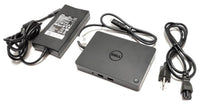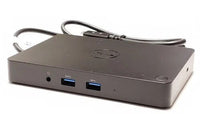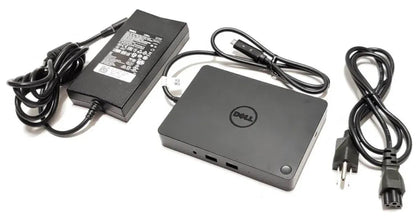
Dell WD19 130W Docking Station (with 90W Power Delivery) USB-C, HDMI, Dual DisplayPort, black

Rs.9,999.00 Rs.7,599.00 SAVE Rs.2,400.00
SKU:
Availability: In Stock Pre order Out of stock
Order On  WhatsApp

Frequently Bought Together

Build your everyday setup

Dell WD19 130W Docking Station (with 90W Power Delivery) USB-C, HDMI, Dual DisplayPort, black - Dream Laptops

Dell WD19 130W Docking Station (with 90W Power Delivery) USB-C, HDMI, Dual DisplayPort, black

Selected configuration

Rs.7,599
Selected laptop
Description
USB-C Business Docking Station

Dell WD19 130W Docking Station

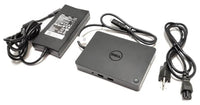
Dell WD19 USB-C docking station with a 130W power adapter and up to 90W power delivery, dual DisplayPort, HDMI, USB connectivity and Gigabit Ethernet for compatible laptop workstations.

The Dell WD19 130W Docking Station is designed to expand a compatible USB-C laptop into a more complete desktop workstation. It combines display outputs, USB ports, audio connections and Gigabit Ethernet through a single docking solution.

This configuration includes a 130W AC power adapter and is listed with up to 90W power delivery to a compatible laptop. Connectivity includes dual DisplayPort 1.4, HDMI 2.0b, USB-C, USB-A and Gigabit Ethernet, making the WD19 suitable for business, office and multi-display setups.

Key Features

130W Power Adapter Supplied configuration uses a 130-watt AC power adapter.
Up to 90W Power Delivery Delivers up to 90W to a compatible connected laptop according to the supplied configuration.
Dual DisplayPort 1.4 Two DisplayPort 1.4 outputs provide flexible external monitor connectivity.
HDMI 2.0b Integrated HDMI connection for a compatible monitor, TV or display.
USB-C Docking Interface Connects to compatible host laptops through USB-C.
Gigabit Ethernet RJ45 network port provides wired Gigabit Ethernet connectivity.
USB-A & USB-C Ports Multiple USB connections are available for compatible peripherals and accessories.
Audio Connectivity Includes combo headset/audio and dedicated audio-out connections as supplied.

Dell WD19 130W Specifications

Brand Dell
Model WD19
Product Type USB-C Docking Station
Docking Interface USB-C
Power Adapter 130W AC
Power Delivery to Laptop Up to 90W
AC Input 120/230V, 50/60Hz
DisplayPort 2 × DisplayPort 1.4
HDMI 1 × HDMI 2.0b
USB-C Display Port 1 × USB-C Multifunction DisplayPort
USB-C Data Port 1 × USB-C 3.1 Gen 2
USB-A with PowerShare 1 × USB-A 3.1 Gen 1
Additional USB-A 2 × USB-A 3.1 Gen 1
Ethernet 1 × Gigabit Ethernet RJ45
Audio 1 × Combo Audio / Headset + 1 × Audio Out
Dimensions 8.1 × 3.5 × 1.1 Inches
Weight 20.63 oz
Color Black

Up to 90W Laptop Power Delivery

This WD19 configuration uses a 130W power adapter and is specified to provide up to 90W power delivery to a compatible connected laptop. The dock's adapter wattage and the power delivered to the laptop are therefore not the same specification.

Multi-Monitor Connectivity

The dock includes two DisplayPort 1.4 outputs, one HDMI 2.0b port and a multifunction USB-C DisplayPort connection. This provides several options for connecting compatible external monitors. Actual display count, resolution and refresh rate depend on the laptop's graphics capabilities, USB-C implementation and connected displays.

USB Connectivity for Your Workspace

The WD19 includes a USB-C 3.1 Gen 2 port, one USB-A 3.1 Gen 1 port with PowerShare and two additional USB-A 3.1 Gen 1 ports. These ports can be used for compatible peripherals such as keyboards, mice and storage devices.

Gigabit Ethernet & Audio

A built-in Gigabit Ethernet RJ45 port allows a compatible laptop to connect to a wired network through the dock. The supplied port list also includes a combo audio/headset connection and a separate audio-out port.

Important Compatibility Information

The Dell WD19 is a USB-C docking station, but having a USB-C port on a laptop does not by itself guarantee full docking functionality. Charging, display output and other features depend on the host laptop's supported USB-C capabilities. Power delivery may also vary depending on the connected system.

Designed for Business Workstations

The WD19 is useful for users who regularly connect a laptop to external monitors, a wired network, keyboard, mouse and other peripherals. A single dock can help create a more organized office, corporate or home workstation.

Pair It with a Dell Laptop

Buy Dell WD19 130W Docking Station in Pakistan

Get the Dell WD19 130W USB-C Docking Station with up to 90W Power Delivery from Dream Laptops.

Visit Our Store:
Shop #74, 4th Floor, Hafeez Center,
Gulberg III, Lahore

Get Store Directions

Frequently Asked Questions

What is the Dell WD19?

The Dell WD19 is a USB-C docking station designed to add display, USB, Ethernet, audio and power connectivity to compatible laptops.

Does the Dell WD19 come with a 130W adapter?

This supplied configuration is listed with a 130W AC power adapter.

Does the WD19 deliver 130W to the laptop?

No. This configuration uses a 130W adapter but is listed with up to 90W power delivery to a compatible laptop.

How many DisplayPort connections does the WD19 have?

It includes two DisplayPort 1.4 ports.

Does the Dell WD19 have HDMI?

Yes. It includes one HDMI 2.0b port.

Does it support USB-C displays?

The supplied specifications include a USB-C multifunction DisplayPort connection. Actual video support depends on the connected laptop and display.

Does the WD19 have Ethernet?

Yes. It includes a Gigabit Ethernet RJ45 port.

How many USB-A ports are included?

The supplied specifications list three USB-A 3.1 Gen 1 ports, including one with PowerShare.

Will the Dell WD19 work with every USB-C laptop?

Not necessarily. Full functionality depends on the laptop's USB-C implementation, including support for charging, display output and required docking features.

Can I connect multiple monitors to the WD19?

The dock provides several display outputs, but the number of monitors, resolutions and refresh rates available at the same time depend on the connected laptop and display configuration.

Where can I buy Dell WD19 Docking Station in Lahore?

Visit Dream Laptops, Shop #74, 4th Floor, Hafeez Center, Gulberg III, Lahore.

Frequently Asked Questions
BEFORE YOU BUY

Frequently Asked Questions

Are your laptops new or used?

We sell used and imported laptops. Check the listing and ask our team about the condition of the exact unit before ordering.

Are all laptops tested before sale?

Yes. Every laptop undergoes a comprehensive quality inspection before dispatch. Our technicians test the processor, RAM, SSD, display, keyboard, battery health, speakers, webcam, Wi-Fi, USB ports, charging port, and all major hardware components. This ensures you receive a fully functional and reliable laptop.

Do you provide a warranty?

Yes. Every laptop purchased from Dream Laptops includes a 30-day hardware warranty. We also offer extended warranty options on selected models. Our warranty provides additional peace of mind when buying a used laptop online in Pakistan. Read the full terms.

Can I upgrade the RAM or SSD?

Yes, most of our laptops support RAM and SSD upgrades, but upgradeability depends on the specific model and series.

Generally Upgradeable Models:

  • HP EliteBook: 640 G1–G10, 650 G1–G10, 840 G1–G8, 850 G1–G8.
  • HP ProBook: 430, 440, 450, 455, 640 and 650 Series.
  • Dell Latitude: 5000 Series (5400, 5410, 5420, 5430, 5440, 5490, etc.) and most 7000 Series.
  • Dell Precision: 3000, 5000 and 7000 Series mobile workstations.
  • Lenovo ThinkPad: T, L, E and P Series, and most X Series (varies by model).
  • Gaming laptops: MSI, ASUS TUF, Acer Nitro and Lenovo Legion laptops generally support RAM and SSD upgrades.
Models with Limited or No RAM Upgrade: Some ultra-thin and premium laptops have soldered (onboard) RAM, which cannot be upgraded. These include many models such as:

  • HP EliteBook 830 G8/G9/G10 and 1040 G9/G10
  • HP Dragonfly Series
  • Dell XPS 13 Series
  • Microsoft Surface Laptop & Surface Pro Series
  • Lenovo ThinkPad X1 Carbon Series
  • Apple MacBook Air & MacBook Pro (Apple Silicon)

SSD Upgrade:

Most business laptops and workstations support PCIe NVMe M.2 SSD upgrades, allowing you to increase storage capacity even if the RAM is not upgradeable. If you're unsure about a specific laptop, contact our team before ordering, and we'll confirm the exact RAM and SSD upgrade options for that model.

Do you deliver throughout Pakistan?

Yes. Laptop delivery costs PKR 2,500, payable in advance. Accessory orders below PKR 20,000 have a PKR 350 delivery charge. Read the shipping policy.

Is Cash on Delivery available?

COD is available for selected orders and locations. Advance laptop delivery charges still apply. Confirm eligibility and the complete payable amount, including applicable COD charges, before ordering.

Can I visit your physical store?

Yes. You are welcome to visit our showroom to inspect laptops before purchasing. Dream Laptops Shop #74, 4th Floor Hafeez Center Gulberg III, Lahore Our experienced team will help you choose the best laptop according to your budget and requirements.

Still have a question? Ask Our Team ↗
Condition and Warranty
BUY WITH CLARITY

Condition & Warranty

Review the exact unit’s details before placing your order.

01 / CONDITION

Exact Laptop Condition

This is a used, imported business laptop. Cosmetic condition, battery health and signs of wear can vary between units. Before ordering, ask our team for current photos and details of the exact laptop’s condition, specifications and included charger.

02 / BATTERY

Battery Health

Battery runtime depends on remaining capacity, usage, brightness and power settings. Please confirm the selected unit’s battery health before purchase.

03 / WARRANTY

30-Day Check Warranty

Every laptop includes a 30-day check warranty. Extended warranty is available; contact our team for options and pricing. Confirm coverage, exclusions and the claim procedure before purchasing, and retain your invoice.

IN-STORE INSPECTION

Inspect Before You Buy

Visit Dream Laptops to inspect the laptop before buying.

Shop #74, 4th Floor, Hafeez Center,
Gulberg III, Lahore

Reviews

Customer Reviews

Be the first to write a review
0%
(0)
0%
(0)
0%
(0)
0%
(0)
0%
(0)